|
|
|
Categories
|
|
Information
|
|
Featured Product
|
|
|
 |
|
|
There are currently no product reviews.
 ;
Awesome quality manual. You really saved my bacon with this one. Was looking for some specific information with regards to my "new" vintage VCR that didn't come with the owners manual. This site is truely a goldmine of available manuals. The quality of the scans are top notch.
Thank-you so much for this awesome manual. If you're looking for this Sony SL-HF400 owners manual, this is the one you NEED to buy. Definitely worth the money.
;
The manual was made available promptly. I is a clean scan of the original. I had no problem downloading it. The scan was well centered and cleanly formatted. It is as good a product as can be had without being the original document.
 ;
Received downlink in less then 8 hours, Item was in good copy condition, and told me how to program the clock timer. The price was very resonable, and the process was very automated and was GREAT to work with.
;
Fast service, document is OK. Thanks! Searched for it long time.
;
I was very pleased with the manual I got for my amateur (ham) radio. Without it I could not figure out how to input and/or change the P/L setting on my radio. It drove me nuts as the radio was essentially useless. That all changed when my manual came. Then it took only minutes and I was done. Now my radio works fine. This is an exceptionally good resource as it's a very easy and user friendly download. Thank you very much! Dziękujemy za!
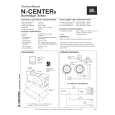
WALL-MOUNTING
MODELS: N24II, N24AWII, N26AWII
Vertical Horizontal
The Northridge Series speaker models indicated above may be wall-mounted. The customer is responsible for proper selection and use of mounting hardware, available through hardware stores,
to properly and safely wall-mount the speakers. This product is not intended for ceiling mounting. Adjustable wall-mounting brackets are included with models N24II and N24AWII. Optional, adjustable,
wall-mounting brackets are available from JBL for model N26AWII. Contact your dealer, or call 800-336-4JBL for a dealer near you, and order model no. WBN26WHT.
TROUBLESHOOTING
If there is no sound from any of the speakers: � Check that receiver/amplifier is on and that a source is playing. � Review proper operation of your receiver/amplifier. If there is no sound coming from one speaker: � Check the �Balance� control on your receiver/amplifier. � Check all wires and connections between receiver/amplifier and speakers. Make sure no wires are touching other wires or terminals and creating a short circuit. � Make sure all wires are connected. Make sure none of the speaker wires are frayed, cut or punctured. � In Dolby* Digital or DTS® mode, make sure that the receiver/ processor is configured so that the speaker in question is enabled. � Turn off all electronics and switch the speaker in question with one of the other speakers that is working correctly. Turn everything back on, and determine whether the problem is in the same place, i.e., the speaker that was working previously now has no sound and the speaker that was not working now sounds fine; or whether it has moved, i.e., the speaker that was not working still has no sound and the speaker that was working is still fine. If the problem is in the same place, the source of the problem is most likely with your receiver or amplifier, and you should consult the owner�s manual for that product for further information. If the problem has followed the speaker, consult your dealer for further assistance or, if that is not possible, visit our Web site at www.jbl.com for further information. If the system plays at low volumes but shuts off as volume is increased: � Check all wires and connections between receiver/amplifier and speakers. � Make sure all wires are connected. Make sure none of the speaker wires are frayed, cut or punctured. � If more than one pair of main speakers is being used, check the minimum impedance requirements of your receiver/amplifier. If there is no (or low) bass output: � Make sure the polarities (+ and �) of the left and right �Speaker Inputs� are connected properly. � Consider adding a powered subwoofer to your system. If there is no sound from the center speaker: � Check all wires and connections between receiver/amplifier and speaker. Make sure all wires are connected. Make sure none of the speaker wires are frayed, cut or punctured. � If your receiver/processor is set in Dolby Pro Logic* mode, make sure the center speaker is not in phantom mode. � If your receiver/processor is set in Dolby Digital or DTS mode, make sure the receiver/ processor is configured so that the center speaker is enabled.
|
|
|
> |
|