|
There are currently no product reviews.
 ;
What can i say but i would have been lost without your support.
Thank You!
;
Très satisfait ! envoi rapide, Grand catalogue disponible. Many thanks !
;
Delivery came quite promptly and in a very readable format. Thank you.
;
I found my Clarion VRX8370R in the Camper I bought and I wasn't able for month to understand it.
The Owner Manual was perfect and just what I was searching for.
Thank you.
Leonardo
;
Very good copy of Manual, clear and easy to print off, arrived very promptly and reasonably priced.
Thanks, I will use you again.
Adjusting
the shelf
glide
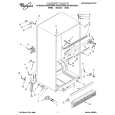
Use the shelf glide to secure odd-shaped items or to separate other items. 1. Grasp glide. 2. Slide glide along track. NOTE: Shelf glide cannot be removed.
Adjusting
the refrigerator
shelves
Adjust the shelves to match the way you use your refrigerator. To remove shelves: 1. Remove items from shelf. 2. Tilt shelf up at front. 3. Lift back of shelf. 4. Pull shelf straight out. To replace shelves: 1. Guide the rear shelf hooks into the slots in the shelf supports on cabinet wall. 2. Tilt shelf up at front until hooks drop into slots. Lower front of shelf to level position.
Removing
the meat
drawer
and cover
To remove the meat drawer: 1. Slide meat drawer out to the stop. 2. Lift front of meat drawer. 3. Slide meat drawer out the rest of the way. 4. Replace in reverse order. To remove the cover: 1. Tilt front of cover up. 2. Lift back of cover. 3. Pull cover straight out. 4. Replace cover in reverse order.
Pull out to the stop, lift the front and pull again.
|