|
|
|
Categories
|
|
Information
|
|
Featured Product
|
|
|
 |
|
|
There are currently no product reviews.
 ;
I'm so glad I was able to find a site to download my missing manuals. Very reasonable prices and they kept me informed about the process and I had my manual within less than a day. The only thing I wish was an option is a 100% English version with no spanish or anything. But overall great site.
;
The manual is complete with excellent quality! One suggestion, show number of pages and weather it is multi-lingual. The AD 600 Manuel is about 76 pages and over half is non English. This results in a larger print job than usually needed. Having this information, one could select the desired pages for printing.
 ;
I've been looking for a copy of the original user/owner manual. Just what the doctor ordered, thank you.
;
the manual was very helpful thank you very much no one else was able to help me thanx
;
This is an excellent handbook. We had no information on the appliance until we obtained this and are now able to use the appliance to its full potential. Strongly recommended.
3gb33021a.fm5 Page 70 Tuesday, June 4, 2002 9:31 AM
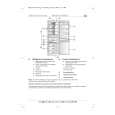
How to use the refrigerator compartment Position the food as shown in the figure. A. Cooked food B. .ish, meat C. .ruit and vegetables D. Bottles E. Butter .. Dairy products, cheese To maintain the vitamins, aroma, substance and freshness of the food to be stored, it is advisable to wrap food in aluminium foil, cling film or place it in special freezer containers with lids. This will prevent odours from mixing. Important Since appliance internal temperature is to all intents and purposes uniform thanks to the new ventilated system (MULTI.LOW .ig.1), foods can be arranged on any shelf; nonetheless, we recommend to arrange the food as shown in .ig. 2 paying attention not to obstruct the air vents (5) .ig. 1, so that air can circulate. Do not place hot food in the refrigerator.
.ig. 2
HOW TO OPERATE THE �COOL� COMPARTMENT (DEPENDING ON MODEL)
The appliance is equipped with a �COOL� compartment To adjust the temperature, use the adjustment button (4) � Towards position (+) for cooler temperatures. � Towards position (-) for less cool temperatures. Removing the �COOL� department To remove the parts for a prolonged period (except normal cleaning operations) � Remove the upper insulating separator and the basket, as illustrated in the figure. .rom this moment, the temperature in the zone where the basket has been removed will automatically reach the refrigerator compartment set temperature.
70
|
|
|
> |
|