|
|
|
Categories
|
|
Information
|
|
Featured Product
|
|
|
 |
|
|
There are currently no product reviews.
 ;
Thanks for offering this item at such a good price. Proved handy in identifying the part I was looking for my set.
;
Thr Video Recorder i have is quiet Old and the Producer could Not help me. So i w as very glad to find an offer for the owners Manual for a very fair Price.a I obtained the original Manual very quick and I am happy to have it now.
 ;
The PDF copy was immediately available on download after the payment. However, I noticed that the document was in German, and Ihad to contact a German translator to get it translated it to English. The quality of document is legible can be used for my purpose.
;
The manual was complete and of great quality. Originally a tri-lingual file, I first received only one language. After a note to owners-manuals.com, I quickly received the remaining languages... Great service, definitely worth it.
;
Thank you for providing this manual and at low cost.
The Philips scope is of excellent quality, longevity and build and had a couple of faults
when it was passed to me. Having the CCT diagrams is a blessing.
I have fixed the problems and also modded the scope to my requirements.
I have built a 24v Li-Ion pack for portable use from old but good laptop batts.
it is working beautifully and I am well pleased. Keep up the good work Guys.
3gb20076.fm Page 2 Wednesday, July 9, 2003 11:24 AM
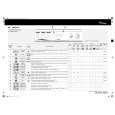
CONSUMPTION DATA
Programme 2 - Cotton 3 - Cotton 4 - Cotton 5 - Synthetics 7 - Synthetics 8 - Wool
Temperature Selector (°C) 90° 60° 45° 60° 45° 40°
Load (kg) 3.5 3.5 3.5 1.5 1.5 1.0
Water (l) 49 48 48 35 37 37
Energy (kWh) 1.72 0.85 0.53 0.80 0.40 0.28
Approx. Programme Duration (hours:minutes) 2:39 2:40 2:19 1:02 0:43 0:42
�Half Load� button (depending on model) � Reduces water consumption above all during rinsing. � Suitable for lightly soiled laundry and small loads (max 2.5 kg). Note: reduce the detergent quantity. DOOR LOCK The door locks automatically after the programme start until the end of the programme. If the programme selector is moved to the �Stop� position or if the electricity supply is interrupted, then after approximately two minutes the door is released. In this case do not open the door, because hot water could come out of the door. PROGRAMME RESELECTION To change a programme when a cycle has already begun: 1. Switch off the appliance by pressing the �ON/OFF� button. 2. Select the new programme. 3. Start the programme by pressing the �ON/OFF� button.
TO INTERRUPT THE RUNNING PROGRAMME To interrupt the running programme and continue it at a later time: 1. Press the �ON/OFF� button. 2. After the desired interval has passed, press the �ON/OFF� button again. END OF WASH CYCLE 1. At the end of the programme the programme selector moves to the �Stop� position. 2. To unload the machine wait for the door to unlock (approx. 2 minutes). 3. Switch off the appliance, open the door and unload the washing. 4. Close the tap and leave the door ajar to allow the drum to dry out. NOTES AND INDICATIONS FOR USE � SPIN SPEED CONTROL Spin speed may be reduced automatically or may even be excluded in case of small loads containing highly absorbing garments (e.g. bath robes, towels, etc). This reduces damage to fabric and to the machine and prevents excessive vibration and noise in the machine due to an unbalanced load: by selecting high spin speeds the noise level increases. CLEANING THE FILTER To ensure an impeccable function of the pump, check the filter regular and clean it if necessary. THERMOSTAT KNOB This is set by turning the knob until it reaches the desired temperature.
Prewash cycle increases programme duration by approx. 15 minutes. Consumption data were measured in normalized conditions in compliance with Standard IEC 60 456. The data on the �Energy Label� refer to programme �Coloured Cotton 60° C�. Consumption data in the home may vary with respect to the values in the table in relation to the water supply pressure and temperature, the load and the type of wash.
ADD DETERGENT, CLOSE THE DOOR AND SELECT THE PROGRAMME Add the detergent as described in the programme table or in the chapter �Detergent and Additives� in the booklet. 1. Make sure that the Programme selector is set to �Stop�. 2. Open the tap. 3. Set Programme Selector to the desired programme. 4. Set the thermostat knob to the desired temperature. 5. Set the spin selector knob to the desired speed. 6. Special options can be selected, if required. 7. Check that the door is well closed and turn on the washing machine by pressing the �ON/OFF� button. The indicator lights up, indicating that the washing machine is on. SELECT ANY DESIRED OPTION �Eco Wash� button (eco) (depending on model) � Reduces the temperature to 60° when the thermostat is set to a higher temperature.
�Rinse Hold� button (depending on model) � The laundry remains in the last rinse water without progressing to the final spin cycle to avoid creasing and prevent colours from changing. � This option is particularly recommended for the programme �Synthetics� or �Delicate�. � This function is particularly useful if you want to postpone spinning to a later time or when you do not wish to spin the clothes. To terminate the �Rinse Hold� option (depending on model) � Press the Rinse hold button again; the load will be spun according to the selected programme. If you do not wish to spin the clothes, turn the programme selector knob to the drain programme, after pressing the �No Spin� button. �No Spin� button � Especially for delicate garments to avoid wear and tear caused by the spin. Note: in the �Cotton� and �Synthetics� programmes the machine will perform a short spin at a low speed, even if the spin cycle has been disabled, so as to optimise rinsing operations.
� �
Whirlpool is a registered trademark of Whirlpool USA.
5019 301 20076
Black process 45.0° 100.0 LPI
|
|
|
> |
|