|
There are currently no product reviews.
 ;
This Service Manual was exactly what I needed to repair my Philips TV. The purchase was convenient and I received the manual at the same day I paid for it.
;
Very pleased with the whole process. Great commication and very easy instructions to order and to download the manual.
;
It's a good manual, this one it's a scan from the original factory service manual, great quality 100% readeable. definetely it worths what I paid for.
 ;
A good manual! fast service and good qualityi for pdf document.
thanks!
;
Very helpful and complete manual. Maybe only one negative is schematics have sometimes unreadable name of the parts. But it's not a big problem.
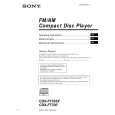
CDX-F7700/F7705X
DISC/ PRESET
PUSH SOUND
MODE DSO D SEEK
OPEN
SEEK
�
+
SCRL S EQ7 E
REP SHUF BBE MP PAUSE
IMAGE
DISC/ PRESET
OFF
SOURCE
1
2
3
4
5
6
DSPL
CDX-F7705X/F7700
The buttons on the unit share the same functions as those on the card remote commander. a 5 SEEK/AMS (.m/M>) buttons b Volume control dial/SOUND button Rotate to: � Adjust the volume. � Adjust the sound settings. Press to: � Select the sound items. 3 qs DISC (ALBUM)/PRESET (+/�) buttons 4 MODE button 6 DSO button 7 SCRL (scroll) button 8 Display window 9 Z (eject) button (located on the front side of the unit, behind the front panel) 12 0 OPEN button 10, 12 qa Receptor for the card remote commander qd OFF (Stop/Power off) button* qf EQ7 button qg RESET button (located on the front side of the unit, behind the front panel) 10 qh SOURCE button qj Number buttons qk DSPL (display mode change) button ql IMAGE button 25
* Warning when installing in a car without an ACC (accessory) position on the ignition switch After turning off the ignition, be sure to press and hold (OFF) on the unit until the display disappears. Otherwise, the display does not turn off and this causes battery drain.
6
6
|