|
There are currently no product reviews.
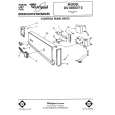
Drying Option Selects 3r Switcl h
Before starting
your dishwasher
3. Run hot water at sink nearest dishwasher until it is hot, then turn it off. 4. If you have a disposal in the sink, run it to clear any food scraps, then turn it off. This will insure good drainage.
1. Spin the Lower Spray Arm to make sure nothing will stop it from turning freely 2. Be sure nothing blocks the center area in the bottom rack. The center wash tower extends through this area during the cycle.
Starting
your dishwasher
A . ,,GH. Wb� 9)
NORMAL WASH Cycle...
1. Select a drying option. 2. Turn the Cycle Control Knob so that it points to NORMAL WASH. 3. Latch the door to start the cycle.
LIGHT WASH Cycle...
1. Select a drying option. 2. Turn Cycle Control Knob until it points to LIGHT WASH. 3. Latch the door to start the cycle.
RINSE & HOLD Cycle...
1. Select AIR DRY Option only. 2. Turn the Cycle Control Knob clockwise until it points to RINSE & HOLD. 3. Latch the door to start the cycle.
Changing a setting
You can change a setting anytime during any cycle. 1. Unlatch the door to stop the cycle. 2. Turn the Cycle Control Knob clockwise to the cycle you want. 3. Be sure the detergent dispensers properly for the new cycle. 4. Latch the door to start the cycle. are filled
|