|
|
|
Categories
|
|
Information
|
|
Featured Product
|
|
|
 |
|
|
There are currently no product reviews.
 ;
High quality scan of the manual, very quick and easy download and very important, a truly honest price. thanks
 ;
Minden rendben, de két megjegyzés, az ábrák nehezen kivehetők és a fizetés után 24 órát kell várni a letöltésre.
;
Manual correct, and complete. Downloads cleanly. Format of manual was presumably difficult to PDF to A4, but works reasonably well.
;
This was a hard to find manual. When I did find it , some sites wanted way too much for the file.
Owner-manual .com had it for a really reasonable price. Not only that but it was sent very quickly and was a quality scanned document, unlike some others I purchased from a different site.
Good job guys!!
Larry
;
Fast and courteous service. Product delivered as described. Thank you.
DEUTSCH
BEDIENUNGSELEMENTE EINLEITUNG
OFF � P�IC ON
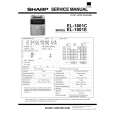
Wir freuen uns, da� Sie sich zum Kauf des elektronischen Rechners Modell EL-1801C von SHARP entschieden haben. Der Rechner ist speziell für leistungsintensiven, arbeitssparenden Betrieb entworfen. Um alle Funktionen dieses neuen SHARP Rechners in vollem Umfang nutzen zu können, lesen Sie bitte diese Bedienungsanleitung sorgfältig durch.
EIN/AUS-SCHALTER; BETRIEBSART-WAHLSCHALTER F�R DRUCKEN / POSTENZ�HLER:
�OFF�: ���: �P�IC�: Netzschalter AUS Netzschalter EIN. Wahl der Betriebsart für Nicht-Drucken. Netzschalter EIN. Bei Additionen bzw. Subtraktionen wird jedesmal beim Drücken von + eine 1 zum Gegenstandszähler hizugefügt und jedesmal beim Drücken von � eine 1 subtrahiert. � Die Zählung wird ausgedruckt, wenn der Rechner das Ergebnis berechnet hat. � Durch Drücken von , C CE C CE wird der Zähler gelöscht. Hinweis: Der Zähler hat eine maximale Kapazität von drei Stellen (bis zu ±999). Wenn dieses Maximum überschritten wird, beginnt der Zähler wieder von Null.
INHALT
� � � � � � � � � Seite BEDIENUNGSELEMENTE ................................................................................... 5 AUSTAUSCH DER TINTENROLLE ...................................................................... 7 AUSTAUSCH DER PAPIERROLLE ...................................................................... 7 AUSTAUSCH DER BATTERIEN ........................................................................... 8 ANSCHLUSS DES NETZSTROMADAPTERS (SONDERZUBEH�R) ................. 8 FEHLER ................................................................................................................ 8 TECHNISCHE DATEN .......................................................................................... 9 RECHNUNGSBEISPIELE ..................................................................................... 45 STEUER-BERECHNUNGEN ................................................................................ 54
F
2
0
A
WAHLSCHALTER F�R DEZIMAL / ADDITION:
�F�: �2, 0�: �A�: In der �F� wird das Ergebnis im Flie�kommasystem angezeigt. Zur Voreinstellung der im Ergebnis erscheinenden Anzahl der Dezimalstellen. Bei Additionen und Subtraktionen wird der Dezimalpunkt automatisch nach der zweiten Stelle der eingegebenen Zahl eingefügt. Mit der Additionshilfe können Additionen und Subtraktionen von Zahlen ohne Eingabe eines Dezimalpunktes ausgeführt werdern. Durch Verwendung von , und wird die Additionshilfe automatisch übergangen und das Ergebnis mit korrekter Dezimalpunktsetzung ausgedruckt.
5/4
HINWEISE ZUM BETRIEB
Um den störungsfreien Betrieb dieses SHARP Rechners sicherzustellen, beachten Sie bitte folgende Punkte: 1. Den Rechner nicht an Orten aufbewahren, wo er extrem hohen Temperaturschwankungen, Feuchtigkeit oder Staub ausgesetzt ist. 2. Zum Reinigen des Rechners verwendet man ein trockenes, weiches Tuch. Keine Lösungsmittel oder feuchte Lappen verwenden. 3. Da dieses Produkt nicht wasserdicht ist, sollten Sie es nicht an Orten benutzen oder lagern, die extremer Feuchtigkeit ausgesetzt sind. Schützen Sie das Gerät vor Wasser, Regentropfen, Sprühwasser, Saft, Kaffee, Dampf, Schwei� usw., da der Eintritt von irgendwelchen Flüssigkeit zu Funktionsstörungen führen kann. 4. Sollte eine Reparatur dieses Gerätes erforderlich sein, wenden Sie sich nur an einen SHARP-Fachhändler, eine zugelassene SHARP-Reparaturwerkstatt oder an eine SHARP-Kundendienststelle. 5. Wenn Sie das Netzkabel von der Steckdose abtrennen, um die Stromversorgung vollständig zu unterbrechen, oder die Batterie ersetzen, wird der aktuell gespeicherte Steuersatz gelöscht. SHARP übernimmt keine Verantwortung oder Haftung für irgendwelche zufälligen oder aus der Verwendung folgenden wirtschaftlichen oder sachlichen Schäden, die aufgrund der falschen Verwendung bzw. durch Fehlfunktionen dieses Gerätes und dessen Zubehör auftreten, ausgenommen diese Haftung ist gesetzlich festgelegt.
RUNDUNGSSCHALTER:
Beispiel: Den Wahlschalter auf �2� stellen. 4 ÷ 9 = 0,444 ... , 5 ÷ 9 = 0,555 ... 4 5/4 9 0.44 0.44 5 9 0.56 0.55
�5�
|
|
|
> |
|