|
|
|
Categories
|
|
Information
|
|
Featured Product
|
|
|
 |
|
|
There are currently no product reviews.
 ;
Copy of genuine owners/operators manual, very useful
;
The manual was a perfect match and was exactly what I was looking for. I'm very satisfied with my purchase.
;
Thank you for having the manual I needed for an older model Aiwa stero I had found on Ebay --- I wanted the Aiwa because I had tapes and cd's but I did not have a manual as to how to operate the system... I found what I needed and it has enabled me to set the system up for my enjoyment.
;
I wished detailed information of the JBL S310 and here I found it! Very happy with the service from this site!
;
The manual was very helpfull, it answerdes all my questions, and i was surprized to find the original manual on this site! Big thumbs uP:)
Removing
(on some models)
the meat drawer
and cover
Remove meat
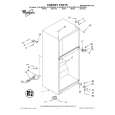
To remove the meat drawer: 1. Slide meat drawer out to the stop.
2. Lift front of meat drawer. 3. Slide meat drawer out the rest of the way. 4. Replace in reverse order.
To remove the cover: 1. Remove meat drawer.
2. Push cover back to release rear clips from shelf. 3. Tilt cover up at front. 4. Pull cover forward and out.
To replace the cover: 1. Fit notches and clips on underside of cover over rear
and center cross bars on shelf. 2. Lower cover into place. 3. Pull cover forward to secure rear clips onto shelf. 4. Replace meat drawer.
Removing
2. Lift the front.
the crisper(s)
and crisper
then the back.
cover
To remove the crisper(s): 1. Slide crisper(s) straight out to the stop.
3. Slide out the rest of the way. 4. Replace in reverse order.
To remove the cover: 1. Lift cover front and remove the cover support.
2. Lift cover up and slide out.
To replace the cover: 1. Fit cover tabs into lowest cabinet slots and push in.
Lower the front retainers into place. 2. Insert cover support (with the long tab toward the front) into the groove on the underside of the cover. NOTE: If the support needs adjustment, turn base clockwise to raise or counterclockwise to lower.
8
|
|
|
> |
|