|
|
|
Categories
|
|
Information
|
|
Featured Product
|
|
|
 |
|
|
There are currently no product reviews.
 ;
It is perfect, exactly what we needed. It's like the paper version but less clutter.
 ;
Received my manual within 24 hours. Very clear scan of the manual I needed. Thanks!
;
Very clear scan, I recommend it. Definitely a must have for any 3362 owner.
Alpine could have written a slightly more complete manual, though. It's already pretty huge, but the unit has so many functions, I feel some more explanation would have been better.
Yamaha's manual of their comparable YDSP-1 is a little better in my opinion.
;
Immediate response with excellent service - highly reccommended
;
Correct manual received and of good quality but the contents of the file for the Service Manual for the same monitor is for a 20" TV not the RGB Monitor.
Removing
(on some models)
the meat drawer
and cover
Remove meat
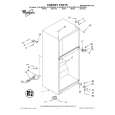
To remove the meat drawer: 1. Slide meat drawer out to the stop.
2. Lift front of meat drawer. 3. Slide meat drawer out the rest of the way. 4. Replace in reverse order.
To remove the cover: 1. Remove meat drawer.
2. Push cover back to release rear clips from shelf. 3. Tilt cover up at front. 4. Pull cover forward and out.
To replace the cover: 1. Fit notches and clips on underside of cover over rear
and center cross bars on shelf. 2. Lower cover into place. 3. Pull cover forward to secure rear clips onto shelf. 4. Replace meat drawer.
Removing
2. Lift the front.
the crisper(s)
and crisper
then the back.
cover
To remove the crisper(s): 1. Slide crisper(s) straight out to the stop.
3. Slide out the rest of the way. 4. Replace in reverse order.
To remove the cover: 1. Lift cover front and remove the cover support.
2. Lift cover up and slide out.
To replace the cover: 1. Fit cover tabs into lowest cabinet slots and push in.
Lower the front retainers into place. 2. Insert cover support (with the long tab toward the front) into the groove on the underside of the cover. NOTE: If the support needs adjustment, turn base clockwise to raise or counterclockwise to lower.
8
|
|
|
> |
|