|
|
|
Categories
|
|
Information
|
|
Featured Product
|
|
|
 |
|
|
There are currently no product reviews.
 ;
Fast and courteous service. Product delivered as described. Thank you.
;
Last week I bought a second hand Panasonic AG-7500 SVHS Hi-Fi Video Cassette Recorder. It is a professional machine with many video and audio options. I feared it would be a huge quest to find a manual. I was delighted when I found owner-manuals.com. After payment I received the file to download the next day already. The quality is great. I am very happy. Thanks!
;
The owner's manual/operating instructions that I purchased was the original factory document and it was in at least three and maybe more languages. I no longer have it because I sold the tape recorder and included the owner's manual/operating instructions and a service/repair manual that I bought on ebay for the new owner.
;
This manual is very useful. Because pioneer sx-q180 is unhandy to use without manual.
;
Manual was destroyed and this purchase made it possible to recover my manual . It was easy to down load and smooth to use thanks .
Adjusting
(on some
the crisper
cover
track
models)
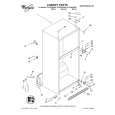
For your convenience, one crisper may be larger than the other, and your crisper cover may have an adjustable track so you can switch positions of the crispers. This allows you to store celery and other longer items in a crisper. You can adjust the cover track with the cover in the refrigerator by removing the crispers and the cover insert. To remove the crisper cover track: 1. Push up glass insert from bottom, then slide out with both hands. 2. Gently pull up on front end of track. 3. Pull rear end of track out of opening in cover.
To replace the crisper cover track: 1. Inset-t rear end of track (with hole) into opening in cover. 2. Lower front end of track into slot. 3. Make sure rear end of track snaps into place on underside of cover.
Adjusting
(on some
the half-width
freezer
shelf
models)
Adjust the shelf according to the space you need in your freezer. Use the bottom position when you don�t need the shelf at all. To adjust the shelf: 1. Remove items from the shelf. 2. Lift shelf up at front. 3. Pull shelf out to the stop. 4. Lift back of shelf. 5. Pull shelf out the rest of the way. To replace the shelf: 1. Slide rear of shelf into desired guide. 2. Lift rear of shelf over stop. 3. Slide shelf in all the way. 4. Lower front into place.
12
|
|
|
> |
|