|
|
|
Categories
|
|
Information
|
|
Featured Product
|
|
|
 |
|
|
There are currently no product reviews.
 ;
This manual is immaculate in it's accuracy. Everything is written very clearly and easy to understand. Written by a professional who wants to convey a clear and easy to understand message!!
;
This Manual (as downloaded) is both informative and comprehensive and has proved to be extremely useful. thoroughly recommended.
;
everything is ok, thank you very much! Product is good, no problems with download!
;
Great site, I always find all the manuals I need and i can't find anywhere else. PDF for the Sony PCM 3348 is complete and scan is good quality. Thank you!
;
It was a complete manual as stated. Very good source for older product manuals. Thanks
GB
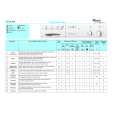
CONSUMPTION DATA
Programme Water Energy Programme duration (min) 120
(l) Cotton 95° C with pre-wash Cotton 95° C Cotton 60° C Synthetic 60° C Cotton short 40° C Synthetic 40° C Delicate 40° C Wool 40° C 1 80
(kWh) 2.00
2 2 3 4
70 70 60 65 60 80 80
1.80 1.20 0.90 0.70 0.60 0.60 0.60
110 110 85 75 75 70 65
PROGRAMME START
1. Plug in the appliance. 2. Turn on the water supply tap. 3. Press the �On/Off� button.
5 6
DOOR LOCK
The door locks automatically after the programme start until the end of the programme.
PROGRAMME END SELECTING THE PROGRAMME
1. Turn the programme selector knob clockwise to the desired programme. 2. Set the temperature knob to the desired temperature. � 1. 2. 3. 4. 5. The programme sequence indicator is at �Stop�. Press the �On/Off� button. Cancel the special options by pressing the appropriate buttons. Turn the water supply tap(s) off. Wait for the door to unlock (about 2 minutes). Open the door and unload the machine.
PRESS THE DESIRED SPECIAL OPTION BUTTON
�Lightly soiled / Half load� button � Reduces water consumption, above all during the rinse. � Especially suitable for lightly soiled or small loads (reduce the detergent quantity). �No spin� button � Press this button to exclude the spin function from the programme. �Rinse hold / Spin delay� button � The laundry remains in the last rinse water without being spun, to avoid heavy creasing. � Especially suitable for the �Synthetic� or �Delicate� programmes, if the laundry is not to be unloaded immediately after the end of the programme. Stopping �Rinse hold� � Press the �Rinse hold� button again; the load will be spun according to the selected programme.
Note: Do not fully close the door but leave it ajar to allow the drum to dry out.
PROGRAMME RESELECTION
1. Press the �On/Off� button. 2. Select the new programme, temperature and relative options. 3. Press the �On/Off� button.
5019 100 00100
|
|
|
> |
|