|
|
|
Categories
|
|
Information
|
|
Featured Product
|
|
|
 |
|
|
There are currently no product reviews.
 ;
It was just what I needed. Thanks for your quick action and great price. You guys are top notch.
Thanks
 ;
Excellent manual, complete, great resolution, easy to read especially the schematics. Thank you !
;
Fast delivery, excellent resolution and complete. And above all, the best price ever !
;
Vielen Dank,
das war eine prima Sache. Habe das Serviceheft nach 3 Stunden herunterladen können. Qualität OK. Hat mir mit Erfolg bei der Fehlersuche und Reparatur meines
Nordmende Galaxy Mesa 9000 geholfen. Ich kann diesen Service bestens weiterempfehlen
A very good service.
Thank You!
;
everything i needed. it was easy to get. and this site is now my go to site for manuals.
UX-510ATH FO-1470TH
SW-B6 No. 6 ~ No. 8 Reserved Set to "0". SW-C1 No. 1, No. 2 Reading slice (Binary) Used to determine the set value of reading density in standard/fine mode. The standard setting is "00" (Factory setting is "00") SW-C1 No. 3, No. 4 Reading slice (Half tone) Used to determine the set value of reading density in half tone mode. The standard setting is "00" (Factory setting is "00") SW-C1 No. 5 Line density selection Used to set the transmission mode which is automatically selected when the Resolution key is not pressed. In the copy mode, however, the fine mode is automatically selected unless the Resolution key is manually set to another mode. SW-C1 No. 6 Reserved Set to "0". SW-C1 No. 7 MTF correction in half tone mode This allows selection of MTF correction (dimness correction) in the half tone mode. When "NO" (=1) is selected, the whole image becomes soft and mild. Clearness of characters will be reduced. Normally set to "YES" (=0). SW-C1 No. 8 Reserved Set to "0". SW-D1 No. 1 ~ No. 4 Number of rings for auto receive When the machine is set in the auto receive mode, the number of rings before answering can be selected. It may be set from one to four rings using a binary number. Since the facsimile telephone could be used as an ordinary telephone if the handset is taken off the hook, it should be programmed to the user�s choice. If the soft switch was set to 1, direct connection is made to the facsimile. If a facsimile calling beep was heard when the handset is taken off the hook, press the START key and put the handset on the hook to have the facsimile start receiving. If it was set to 0 accidentally, receive ring is set to 1. NOTE: If the machine is set to answer after a large number of rings, it may not be able to receive faxes successfully. If you have difficulty receiving faxes, reduce the number of rings to a maximum of 6. SW-D1 No. 5 Automatic switching manual to auto receive mode This soft switch is used to select whether the machine should switch to the auto receive mode after 5 rings in the manual receive mode or remain in the same way as SW-D1 No. 1, No. 2, No. 3 and No. 4 "0"1"0"1"(5 rings). SW-D1 No. 6 Reserved Set to "0". SW-D1 No. 7, No. 8 CI detect frequency Detection frequency of ring signal for auto reception is set. When set to No. 6=0, No. 7=0, frequency is set to PTT recommendation. When set to No. 6=0, No. 7=1, frequency is set to 11.5Hz or more. When set to No. 6=1, No. 7=0, frequency is set to 13.0Hz or more. When set to No. 6=1, No. 7=1, frequency is set to 20.0Hz or more. SW-D2 No. 1 ~ No. 8 Reserved Set to "0". SW-D3 No. 1 ~ No. 5 CI off detection timer (0-1550ms setting by 50ms step) Set the minimum time period of CI signal interruption. (Example)
A
B
400msec
1
2000msec
01110 (50ms ~ 14): 700ms (CI interruption>700ms:Judged as a CI OFF section) The section 1 is not judged as a CI OFF section, the CI signal A is counted as one signal. The section 2 is judged as a CI OFF section, the CI signal B is considered as the second signal. 00111 (50ms ~ 7): 350ms (CI interruption>350ms:Judged as a CI OFF section) The section 1 is judged as a CI OFF section, and the CI signal A is counted as two signals. The section 2 is judged as a CI OFF section, and the CI signal B is considered as the third signal. SW-D3 No. 6 ~ No. 8 Reserved Set to "0". SW-E1 No. 1 Automatic switching mode Used to set auto TEL/FAX switching mode or to set the normal fax mode. SW-E1 No. 2, No. 3 Pseudo ringing time at the tel/fax automatic switching mode Choice is mode as to how long to ring the dummy ringer on TEL/FAX automatic switching mode. SW-E1 No. 4 Number of CNG signal detection at the tel/fax automatic switching mode Used for detection of CNG in one or two tones in the TEL/FAX automatic switching mode. SW-E1 No. 5 CNG detection when TEL/FAX mode The switch which sets the time from the start of CNG detection to the end of detection. SW-E1 No. 6 Pseudo ringer ON/OFF cycle When set to "0", pseudo ringer is 1 sec ON and 2 sec OFF cycles. When set to "1", pseudo ringer is 1 sec ON and 4 sec OFF cycles. SW-E1 No. 7 Post answer tone (TEL/FAX mode) When set to "0", machine send the tones in TEL/FAX auto changeover mode. SW-E1 No. 8 Type of post answer tone When set to "0", post answer tone is 800Hz single tone. When set to "1", post answer tone is 880Hz/988Hz/1046Hz(LA-SI DO) tone. SW-E2 No. 1 ~ No. 4 Pseudo ringer sound volume (0 ~ -15dBm setting by 1dBm step) Used to adjust the sound volume of pseudo ringer to the line (ring back tone) generated on selecting TEL/FAX. SW-E2 No. 5 ~ No. 8 Post answer tone transmission level (0 ~ -15dBm setting by 1dBm step) Used to adjust the sound volume of post answer tone to the line generated on selecting TEL/FAX.
2
2 � 15
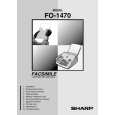 $4.99 FO1470 SHARP
Owner's Manual Complete owner's manual in digital format. The manual will be available for download as PDF file aft…
|
|
|
> |
|










