|
|
|
Categories
|
|
Information
|
|
Featured Product
|
|
|
 |
|
|
There are currently no product reviews.
 ;
Immediate response with excellent service - highly reccommended
;
Correct manual received and of good quality but the contents of the file for the Service Manual for the same monitor is for a 20" TV not the RGB Monitor.
;
The owners manual for the Pioneer VSX-D603S was exactly what I needed. I received it in a timely manor and it was priced fairly. I definately will use your servise again. Thank You
;
This is a great manual. It was easy to read and very accurate. The size of the manual is small so email is no problem. I highly recommend it. The manual is very hard to find other than this website.
;
Manual was complete and available promptly, since I had lost my original manual. Very good response.
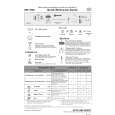
What to do if...
If a fault occurs, before contacting our After-Sales Service, make the following checks to try and remedy the problem (* see also the corresponding chapter in the user instructions).
Problem
Cause
� Open the tap.
Remedy
The appliance is not � No water supply. working
� The appliance does not load sufficient water. � There is a power failure.
� Clean the water supply tap filter. Ensure there are no kinks in the water hose. � � � � Insert the plug into the mains socket. Press the Start button. Close the door. Check the domestic circuit fuse.
� Starting the selected programme. � The programme can be set to �0� to start.
If crockery is not perfectly dry If crockery is not perfectly clean
� Insufficient rinse aid. � Residual water in cavities. � The water jet does not reach the crockery. � Insufficient detergent. � Unsuitable programme. � Spray arms blocked. � Spray arm nozzles clogged.
� Increase dosage *. � Load crockery at an angle. � Arrange crockery so that items do not touch each other. Load crockery upside down. � Follow recommended detergent dosage. � Select a more intense wash cycle. � The spray arms must be able to turn freely. � Remove any impurities obstructing the water flow *.
� Incorrect detergent/detergent too � Use a good quality detergent. old.
Sandy or grainy residues Colour of plastic parts faded Deposits on crockery
� removable
� Clogged filters. � Filters incorrectly assembled. � Tomato/carrot juice...
� Check filters regularly/if necessary clean *. � Insert the filter correctly *. � Depending on the material, if necessary use a detergent with a greater whitening power.
� Streaks on the crockery/glasses. � Streaks on glasses. � Layer of salt on crockery/glasses.
� Increase the rinse aid dosage *. � Reduce the rinse aid dosage *. � Close the salt container lid properly*. � Change water hardness setting, if necessary add salt *. � Use suitable glasses.
� not removable
� Insufficient water softening, calcium deposits.
Opaque glasses/ � Cannot be washed in the glasses not sparkling dishwasher. Rust on cutlery Identifying appliance faults
� Not made of stainless steel.
� Use suitable cutlery.
� The START indicator lamp flashes. � Ensure the filter assembly is not clogged and � Indicator F... (if provided). that there is no interruption to the water supply (if necessary, clean the filters *). Start the programme again. Press the START button for 2 seconds, until the START indicator lamp switches off. Select a new programme and press the Start button again.
If after carrying out the above checks the malfunction persists or appears again, turn the appliance off and turn off the water supply tap, then call our After-Sales Service (see guarantee). Before contacting our After-Sales Service, take note of the following:
� The nature of the fault. � The appliance type and model. � The service code (the number indicated on the adhesive rating plate) inside the door on the right-hand side.
|
|
|
> |
|