|
|
|
Categories
|
|
Information
|
|
Featured Product
|
|
|
 |
|
|
There are currently no product reviews.
 ;
This manual is very helpfull to use the Power Supply. All technical information has been available.
For service use the circuit diagrams are very good.
Thanks .
;
Very comprehensive document which is a must-have for any Satellit 2100 owner whose set up is somewhat intricate. Due to the bad quality of the pictures that are rather dark and a bit blurred I gave 4-star feedback.
;
The manual was missing 2 pages but when I presented the problem to the company they made every attempt to get the 2 pages to me, when they couldn't they refunded my money. A very pleasing and easy transaction. The manual they provided was the original, it was concise and to the point. I plan to do business with this company again when should the need arise.
 ;
The owners manual is very good. all my how to questions were answered in detail.
;
Irrespectively of this manual exist only germany language, it's useful - although i need some additional task to translate: My english is bad, but usable - but i really dont speak germany. :)
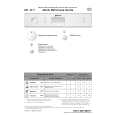
Bedienung des Gerätes
Zusätzliche Hinweise finden Sie in den einzelnen Kapiteln der Gebrauchsanweisung.
Gerät einschalten
EIN / AUS-Taste drücken.
Kammer A: Bei jedem Spülgang.
A
BC
Reiniger einfüllen
Kammer B: Nur bei Programmen mit Vorspülen.
Klarspüler kontrollieren
Mechanische Anzeige C. Elektrische Anzeigelampe auf Bedienungsblende (wenn vorhanden). Nur wenn Wasserenthärter vorhanden. Mechanische Anzeige D. Elektrische Anzeigelampe auf Bedienungsblende (wenn vorhanden).
Regeneriersalz kontrollieren
Körbe beladen Tür schlie�en, Wasserhahn öffnen Programm wählen Zusatzfunktionen wählen
Siehe Beladungshinweise.
Das zuletzt gewählte Programm leuchtet. Auf gewünschtes Programm einstellen (mit Taste oder Drehknopf). Entsprechende Anzeigelampe leuchtet auf. Bei Bedarf (wenn vorhanden). Entsprechende Anzeigelampe leuchtet auf. �Programm wechseln�
START-Taste drücken
Danach ist das gewählte Programm gespeichert (auch bei Stromausfall).
START-Taste 2 Sek. gedrückt halten, bis Anzeigelampe erlischt; Programm neu wählen und START-Taste erneut drücken.
- Tür nur wenn erforderlich öffnen (Vorsicht: Hei�er Dampf). - Wird das Gerät vorzeitig ausgeschaltet, läuft das Programm nach dem Wiedereinschalten an der unterbrochenen Stelle weiter. Erst nachdem die START-Taste erloschen ist: EIN / AUS-Taste drücken. Sämtliche Anzeigelampen erlöschen. Achtung: Dampfaustritt beim �ffnen der Tür! Beim Entladen des Gerätes mit dem Unterkorb beginnen.
Wasserhahn schlie�en, Körbe entladen
Spülvorgang
Gerät ausschalten
BK/II/B/D
|
|
|
> |
|