|
|
|
Categories
|
|
Information
|
|
Featured Product
|
|
|
 |
|
|
There are currently no product reviews.
 ;
Manual was destroyed and this purchase made it possible to recover my manual . It was easy to down load and smooth to use thanks .
 ;
Turns out this was not the manual i was looking for. The concertmate 670 keyboard i have is a "Realistic" model made for Radio Shack and none of the diagrams on the owners manual i received matches up. HOWEVER, I must say the service Owners Manual provides was fast and efficient by being available online. The manual was in good readable condition and easily downloaded.
;
Great price, Quick delivery, the document was very usefull A+++++++++++++++
;
Thank´s for your help, I already recived these manual from you
;
Thank you for your manual It has the basic things to and i use the Oszi for Longer Time.
THX
Playing Back a Message at a Desired Time with an Alarm (continued)
To cancel the alarm setting before the playback starts
Press STOP while the alarm sound is heard. You can stop even when the HOLD function is activated. Notes
� You cannot set the alarm if you have not set the clock or there is no message in the selected file (the unit will not enter the alarm setting mode when you press MENU in Step 2 on page 21). � If you try to set the alarm to play back a message at a previously set time on another message, �PRE SET� will be displayed, preventing new settings. � If the alarm time comes while another message is being played back with an alarm, the playback stops and the new message will be played back. � If the alarm time comes during recording, alarm will sound for 10 seconds after the recording is finished and playback begins. �,� will flash when the alarm time comes. � If more than one alarm time comes during recording, only the first message will be played back. � If the alarm time comes when the unit is in the menu mode, alarm will sound and the menu mode will be cancelled. � If you erase the message you set the alarm to play back, the alarm setting will be cancelled. � You can adjust the playback volume with the VOL control. � If the alarm time comes during erasing, alarm will sound for 10 seconds after the erasing is finished and playback begins. � Alarm setting will not be cancelled when the alarm playback finishes. To cancel alarm setting, see page 25.
24
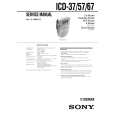 $4.99 ICD57 SONY
Service Manual Complete service manual in digital format (PDF File). Service manuals usually contains circuit diagr…
|
|
|
> |
|