|
|
|
Categories
|
|
Information
|
|
Featured Product
|
|
|
 |
|
|
There are currently no product reviews.
 ;
Perfect like it was descriped, Perfect like it was descriped
;
Very good detail, all pages clear, exactly what I needed
;
Excellent service, and just what I needed to service my TU-7700. All pages of the manual are clear and easily readable.
;
Excellent printing quality.
A complete and very usefull service manual with all details.
GREAT SERVICE AT VERY LOW PRICE!
A+++++++++++++++++++++++++
;
We received the manual in a timely manner and it was exactly what we were expecting. Excellent replacement for original Service Manual.
All schematics are very legible. We are really satisfied.
Chapter 15
15.8.1.1.5 <PDL-PRT> PDL Print Counter It increases its count when paper is delivered outside the machine or stacked for duplexing in keeping with the charge counter when in PDL print mode. It does not increase its count in the case of blank paper. It increases its count by 1 for large and small sheets alike. When the count exceeds '99999999', it returns to '00000000'. 15.8.1.1.6 <FAX-PRT> Fax Reception Print Counter It increases its count when paper is delivered outside the machine or stacked for duplexing to suit the charge counter in fax reception mode. It does not increase its count in the case of blank paper. It increases its count by 1 for large and small sheets alike. Its count may be reset. When the count exceeds '99999999', it returns to '00000000'. 15.8.1.1.7 <RMT-PRT> Remote Print Counter It increases its count when paper is delivered outside the machine or stacked for duplexing in keeping with the charge counter in remote print mode. It does not increase its count in the case of blank paper. It increases its count by 1 for large and small sheets alike. Its count may be reset. When the count exceeds '99999999', it returns to '00000000'. 15.8.1.1.8 <BOX-PRT> Box Print Counter It increases its count when paper is delivered outside the machine or stacked for duplexing in keeping with the charge counter in box print mode. It does not increase its count in the case of blank paper. It increases its count by 1 for large and small sheets alike. Its count may be reset. When the count exceeds '99999999', it returns to '00000000'.
15-285
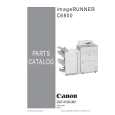 $4.99 IRC6800 CANON
Parts Catalog Parts Catalog only. It's available in PDF format. Useful, if Your equipment is broken and You need t…
|
|
|
> |
|