|
|
|
Categories
|
|
Information
|
|
Featured Product
|
|
|
 |
|
|
There are currently no product reviews.
 ;
reasonable price for the schematic - the service is perfect, all as expected and pointed by instructions - good scan of the original plans - thank you!
;
Manual was just as described!!! I odered it and in less than a day was able to download it and the text was clear and pages were all complete just as the original manual was. Purcashed this for a friend and they were more than happy. Perfect all around!
 ;
Excellent service and prompt delivery. But it's not a manual - only 4 pages wiring diagrams.
Thanks.
;
The manual I purchased was exactly what I needed to repair my Toshica television. The manual contained schematics and troubleshooting information that was very helpful.
;
Il download del Service Manual JVC HR 4100 non é stato eseguito
Symptoms
� A longer readout time is required (�CHECK� keeps flashing on the display). � Tracks do not play back in the order you have intended them to play. � Elapsed playing time is not correct.
Remedies/Causes
Do not use too many hierarchies and folders.
Playback order is determined when the files are recorded. This sometimes occurs during play. This is caused by how the tracks are recorded on the disc. Insert a disc that contains MP3/WMA tracks. This unit can only display alphabets (upper case), numbers, and a limited number of symbols. Insert a disc into the magazine. Insert the magazine. Connect this unit and the CD changer correctly and press the reset button of the CD changer. Press the reset button of the CD changer.
� �NO FILES� appears on the display. � Correct characters are not displayed (e.g. album name). � �NO DISC� appears on the display. � �NO MAG� appears on the display. � �RESET 8� appears on the display.
CD changer MP3/WMA playback
� �RESET 1� � �RESET 7� appears on the display. � The CD changer does not work at all.
Reset the unit (see page 2).
� Microsoft and Windows Media are either registered trademarks or trademarks of Microsoft Corporation in the United States and/or other countries.
20
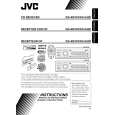 $4.99 KD-AR470 JVC
Owner's Manual Complete owner's manual in digital format. The manual will be available for download as PDF file aft…
|
|
|
> |
|