|
|
|
Categories
|
|
Information
|
|
Featured Product
|
|
|
 |
|
|
There are currently no product reviews.
 ;
I purchased the unit from a private party and the original owners manual was not available. Having the ability to download it was extremely helpful and clarified operating the equipment immensely. This is a complicated unit and without the manual I would not have been able to maximize it's potential. Thank you.
;
Being a user of older radios of many kinds, preferring them over more modern rigs, this manual was invaluable in the programming of my two. I now know for certain what the assorted buttons functions are, and am very grateful to have found this excellent site. Many thanks for your assistance, Tony.
 ;
Clear and easy to read. All details as expected. Price acceptable , and quick delivery.
;
Quick response and exactly what I was looking for and at a great fair price!
;
5 star quality on these downloadable manuals. Easy to read and all the information is there. A must when doing a custom install or needing to service your precious old school electronics.
Manual preset
ENGLISH
You can preset up to 6 stations in each band (FM1, FM2, FM3 and AM) manually. Ex: Storing an FM station of 88.3 MHz into the preset number 1 of the FM1 band
Notes: � A previously preset station is erased when a new station is stored in the same preset number. � Preset stations are erased when the power supply to the memory circuit is interrupted (for example, during battery replacement). If this occurs, preset the stations again.
1
Select the FM band (FM1 � 3) you want to store FM stations into (in this example, FM1).
� Each time you press the button, the FM band changes as follows:
FM
Tuning into a preset station
You can easily tune into a preset station. Remember that you must store stations first. If you have not stored them yet, see �Storing stations in memory� on page 7.
F1
F2
F3
(FM1) (FM2) (FM3)
2
Tune into a station of 88.3 MHz.
Press ¢ to tune in
1
Select the band (AM, FM1 � 3).
AM FM
F1
F2
F3
stations of higher frequencies. Press 4 to tune in stations of lower frequencies.
AM
(FM1) (FM2) (FM3)
2
3
Press and hold the number button (in this example, 1) for more than 2 seconds.
Select the number (1 � 6) for the preset station you want.
Band/preset number and �MEMO� flash alternately for a while.
4
Repeat the above procedure to store other stations into other preset numbers.
8
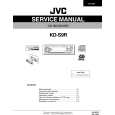 $4.99 KDS9R JVC
Service Manual Complete service manual in digital format (PDF File). Service manuals usually contains circuit diagr…
|
|
|
> |
|