|
|
|
Categories
|
|
Information
|
|
Featured Product
|
|
|
 |
|
|
There are currently no product reviews.
 ;
This manual is very helpfull to use the Power Supply. All technical information has been available.
For service use the circuit diagrams are very good.
Thanks .
;
Very comprehensive document which is a must-have for any Satellit 2100 owner whose set up is somewhat intricate. Due to the bad quality of the pictures that are rather dark and a bit blurred I gave 4-star feedback.
;
The manual was missing 2 pages but when I presented the problem to the company they made every attempt to get the 2 pages to me, when they couldn't they refunded my money. A very pleasing and easy transaction. The manual they provided was the original, it was concise and to the point. I plan to do business with this company again when should the need arise.
 ;
The owners manual is very good. all my how to questions were answered in detail.
;
Irrespectively of this manual exist only germany language, it's useful - although i need some additional task to translate: My english is bad, but usable - but i really dont speak germany. :)
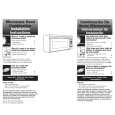
Using Your Microwave Oven
Using the Cooktop Light
1. Turn on light and choose the brightness from 0 to 100%. TOUCH LIGHT ON/OFF
LIGHT
ON / OFF
Using the Sensor Nite Lite 1. TURN to select Custom. PRESS for next screen. 2. TURN to select Nite Lite. PRESS for next screen. 3. TURN to Set Level and PRESS. 4. TURN the Nite Lite monitor from 0% to 100%.
Current room light level
Set activation level
To increase cooktop brightness, TOUCH the Upper arrow. To decrease cooktop brightness, TOUCH the Lower arrow. 2. Turn off light when desired. TOUCH LIGHT ON/OFF
To increase activation level turn the MICRO-DIAL� control forward to desired level and PRESS. NOTE: The current room light level will fluctuate based upon current light conditions.
Using the cooking rack
The cooking rack gives you extra space when cooking in more than one container at the same time.
Inserting the rack
Insert the rack securely into the rack supports on the side walls of the oven.
NOTES: � Only use the cooking rack when cooking at more than one level. � Use rack only in the microwave oven. � Do not let food container on rack touch the top or sides of the oven. � Do not use rack with browning dish. � Do not place a metal cooking container on rack. � Do not store the metal rack in the oven. Do not operate the oven with the metal rack stored on the floor of the oven. Damage to the interior finish will result. � Use oven mitts to remove items from microwave oven. � Do not cook foods directly on rack. Put them in microwave-safe containers first.
21
|
|
|
> |
|