|
There are currently no product reviews.
 ;
This was an excellent source of detailed assembly information on a device which is at least 12 years old. A very lucky find, coupled with great service.
;
Excellent Service Manual and best price on the Internet. This Service Manual covers everything you could ever need including full circuit schematics, component layout diagrams, stripdown procedure and full parts list/breakdown. I needed this to carry out a modification to one of these headunits and this manual covered everything I needed. Fast delivery, processed within a few hours.
 ;
Thought I would never find a copy of the Technics SX-EN2 Service Manual until I found Owner-Manuals.com. Price was very fair and I received the download promptly. While a photocopy, it is quite readable and includes all the pertinent information and diagrams. Thank you Owner-Manuals!
;
I really like this manual and it's reliable.I found and bought easly.thank you.
;
Thank you very much. the Instruction corresponds to my expectations. Sent it in time. I don't regret that paid money.
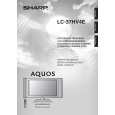
LC-37HV4E
REMOVING OF MAJOR PARTS
1.Take off the center and lower terminal covers. 2.Remove the two speaker fixing screws each and the speaker connecting terminal, and take off the speaker. 3.Remove the four stand fixing screws and take off the stand. 4.Remove the 19 cabinets A/B fixing screws and take off the cabinet B. 5.Remove the two Key PWB assembly fixing screws and the connector, and take off the Key PWB assembly. 6.Remove the Key PWB insulating sheet fixing screw and take off the Key PWB insulating sheet. 7.Remove the four Main PWB shield fixing screws and take off the Main PWB shield. 8.Remove the four stand angle fixing screws and take off the stand angle.
4
Speaker (right) 2
4
1
3 4
Terminal cover (center) Stand Terminal cover (lower) 2 Speaker (left)
5
Key PWB assembly 7
6
P152
P151
Main PWB shield Key PWB insulating sheet
Stand angle 8
12
|