|
|
|
Categories
|
|
Information
|
|
Featured Product
|
|
|
 |
|
|
There are currently no product reviews.
 ;
A complete manual with all the needed details of calibrations and service instructions about the radio receiver.
A big deal.
Many thanks !
;
Fast delivery and good quality copy. To be recommended
;
Excellent product, very clear print. Detailed circuit and assembly diagrams - this enabled me to repair my CD player with confidence. I highly recommend this site.
;
Fast access, 100% correct and complete service manual
;
just what i was seeking .had a password issue but the review allowed me to circumvent and download was great
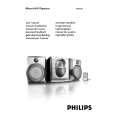
Controls
! PROGRAM (PROG) Controls on the system and
for CD ................. programs tracks and reviews the
remote control program.
@ 1 STANDBY-ON / y for Tuner ............. programs tuner stations manually
� switches the system to standby/on. or automatically.
1 2 � selects the respective sound source for CD/ FM/ # OPEN�CLOSE
� opens/closes the CD door. MW/ TAPE. switches playback sound off and on. � (Dynamic Bass Boost) enhances the bass. switches on the system. � connect headphones.
2 SOURCE (CD/ TUNER/ TAPE) @
3 DBB1 / DBB2 (DBB) $ MUTE
5 4 Display % SLEEP
shows status of system. � activates/deactivates or selects the sleeper time. Mode Selection 5 ! for ................. stops CD playback or erase a PLAY�PAUSE �� % for ................. starts or pauses CD playback. ¡1 2� / à TUNE á (à /ë) for CD ................. skips to the beginning of a
PREPARATIONS AND CONTROLS
# STOP 9
7
0 CD program.
! current track/previous/ next
track. within a track/CD. ................................. selects a preset radio station. 0
3-2
1 fast searches back and forward 2 for Tuner ............. tunes to radio stations. 9 RECORD 0 ....... starts recording.
PLAY 2 ................. starts playback. à / á ............... fast rewinds/forwards the tape. STOP�OPEN ... stops tape; opens the tape 8 compartment. Tape Deck Operation
6
3 4
5 PAUSE ................... pauses recording or playback. 7
7 VOLUME (VOL 3 / 4 )
â�� adjusts volume level. â�� adjusts the hours and minutes for clock/ timer functions. Notes for remote control: iR SENSOR â�� First select the source you wish to control 8 â�� infrared sensor for remote control. by pressing one of the source select keys on TIMER / CLOCK the remote control (for example CD , 9 â�� activates/deactivates or sets the timer function. TUNER). sets clock function. â�� Then select the desired function (for â�� views the clock time. exampleÃ�, Ã, ë). REPEAT / SHUFFLE 0 â�� repeats a track/CD program/ entire CD. â�� plays CD tracks in random order.
6
|
|
|
> |
|