|
|
|
Categories
|
|
Information
|
|
Featured Product
|
|
|
 |
|
|
There are currently no product reviews.
 ;
Manual was complete and available promptly, since I had lost my original manual. Very good response.
;
Whilst this is a photo copy, and some of the pages are a little askew, it was all readable and intact. A real bonus finding an old manual for a classic piece of kit that no other site had.
Great stuff.
;
excellent quality, contains circuits and scan quality, 110 pages
;
It was easy done, and I got exactly what I was looking for.
;
The manuel was exactly what I needed and I received it promptly. Thanks
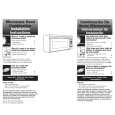
USING YOUR MICROWAVE OVEN
USING EZ-TOUCH COOK CONTROL
You can cook microwavable foods just by choosing a category and quantity. EZ-TOUCH COOK control has preset times and cook powers for 6 categories (see following chart). To use EZ-TOUCH COOK control, follow the steps below: You see
TM
3. Touch Number pad to enter the quantity.
1
Example for 1 cup (250 mL)
1. Touch
COOK
QTY
ENTER
Example for 1 cup (250 mL)
once
You see
AUTO ENTER COOK
4. Touch
START
ENTER
You see
2. Touch COOK 1 to 6 times to choose the type of food.
COOK
AUTO
COOK
TIME
(countdown time may vary)
Example for rice
once
OR Touch a Number pad to choose the type of food.
1
You see
AUTO COOK
Example for rice
Example for rice
NOTES: � If you do not enter a quantity within 2 seconds, EZ-TOUCH COOK control will prompt you to choose a quantity. You then have 1 minute to enter a quantity and to touch START/ENTER. If you do not do so, EZ-TOUCH COOK control will be canceled. � If you touch COOK 7 times, the display returns to the Rice setting. � If you need more or less time, do not touch COOK again. Touch COOK POWER before you touch START/ENTER. (See �Changing preset cooking times� in the �Getting to Know Your Microwave Oven� section.) � When cooking bacon, keep in mind that differences in the amount of fat, meat, thickness, and curing process will affect how bacon is cooked. Also, regular sliced bacon averages about 16 slices per pound. � Progress Bar shows approximate time remaining.
ENTER
QTY
21
|
|
|
> |
|