|
There are currently no product reviews.
 ;
Very clear copy. No pages missing. Big bonus is that it includes supplement. Price is affordable compared to what others ask for.
;
Found the quality of the copy excellent and a very quick service. I would certainly recommend the service.
;
Good quality, clear diagrams. Exactly what I needed.
 ;
Good product. All the information is invcluded, but due to the complexity of the amplifier, it still is difficult to get it to operation again.
;
Very professional seller; very fast, accurate and rielable service.
Read/write attribute setting
MP170: Press the Menu button to move to System Settings and go to Others, then perform the selection. MP450: On standalone machine, press the Menu button to move to Maintenance / Settings; select Device Settings, Other Settings, and perform the selection. A period of time before entering the power saving mode can be specified. MP170: Press the Menu button to move to System Settings and go to Others, then perform the selection. MP450: On standalone machine, press the Menu button to move to Maintenance / Settings; select Device Settings, Other Settings, and perform the selection. MP450 only: The contrast of the LCD can be adjusted. On standalone machine, press the Menu button to move to Maintenance / Settings, select Device Settings, then Other Settings, and perform the selection. MP450 only: The slide show display quality can be selected. On standalone machine, press the Menu button to move to Maintenance / Settings; select Device Settings, Other Settings, and perform the selection. MP170: Press the Menu button to move to System Settings and go to Others, then perform the selection. MP450: On standalone machine, press the Menu button to move to Maintenance / Settings; select Device Settings, Other Settings, and perform the selection. The language to be used on the LCD can be selected. MP170: Press the Menu button to move to System Settings and go to Others, then perform the selection. MP450: On standalone machine, press the
Power saving mode setting
Contrast adjustment
Slide show setting
Date display
Language selection
1-20
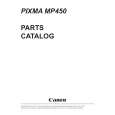 $4.99 MP450 CANON
Parts Catalog Parts Catalog only. It's available in PDF format. Useful, if Your equipment is broken and You need t…
|