|
|
|
Categories
|
|
Information
|
|
Featured Product
|
|
|
 |
|
|
There are currently no product reviews.
 ;
Very good copy, very readable and easy transaction as always.
;
It is perfect, exactly what we needed. It's like the paper version but less clutter.
 ;
Received my manual within 24 hours. Very clear scan of the manual I needed. Thanks!
;
Very clear scan, I recommend it. Definitely a must have for any 3362 owner.
Alpine could have written a slightly more complete manual, though. It's already pretty huge, but the unit has so many functions, I feel some more explanation would have been better.
Yamaha's manual of their comparable YDSP-1 is a little better in my opinion.
;
Immediate response with excellent service - highly reccommended
Editing Recorded MDs
5
Press AMS or YES. A flashing cursor appears in the display. The deck starts playing and you can name a track while monitoring the sound.
9
Repeat steps 7 and 8 until you have entered the entire title.
If you entered the wrong character
Press 0 or ) until the character to be corrected starts flashing, and repeat steps 7 and 8 to enter the correct character.
To erase a character
6
Press TIME/CHAR to select the character type as follows: To select
Uppercase letters Lowercase letters Numbers Symbols
Press 0 or ) until the character to be erased starts flashing, then press CLEAR.
Press TIME/CHAR repeatedly until
�A� appears in the display �a� appears in the display �0� appears in the display � � � appears in the display
To enter a space*
Press AMS while the cursor is flashing. To enter a space after the title, press AMS or ).
* You cannot select a space for the first character of the title.
10 Press YES.
To cancel labeling
Press MENU/NO or p. Notes
7
Turn AMS to select the character. The selected character flashes. Letters, numbers, symbols, and a space appear in sequential order as you turn AMS. You can use the following symbols in titles: ��/,.():!?&+<> _=�;#$%@ `
� You cannot label an MD during recording. � You cannot label a track or an MD while you are recording over an existing track.
You can press TIME/CHAR to change the character type at any time during step 7 (see step 6 above).
8
Press AMS to enter the selected character. The selected character stops flashing and the cursor flashes waiting for the input of the next character.
34
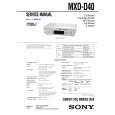 $4.99 MXDD40 SONY
Service Manual Complete service manual in digital format (PDF File). Service manuals usually contains circuit diagr…
|
|
|
> |
|