|
|
|
Categories
|
|
Information
|
|
Featured Product
|
|
|
 |
|
|
There are currently no product reviews.
 ;
un manual completo con una calidad de imagen buena con explicaciones en varios idiomas de los ajustes y detalles en conjunto un OK.
;
Good copy, clear and has all necessary information. Very happy with the purchase
 ;
buen manual con sus formas de onda y esquemas , completo y de buena calidad de imagen, es correcto.
;
This is exactly what I needed This was a hard one to find and I had already downloaded several for other Panasonic radios but none matched my radio.
Although my radio is the LBE model the LBS is the same.
A very good quality manual with every thing you should get in it
;
el manual es correcto , completo y de buena calidad aunque algun esquema esta excesivamente diseccionado.
5-2. Replacing the CPU
Note: We have two kinds of CPU for this set, and either of them is used. Two kinds of CPU have differences in the lock position and the unlock position.
1. Socket con�guration 1
1. How to remove the CPU 1 Rotate the lock with a flat-blade screwdriver toward the unlock position shown in the figure. 2 Remove up the CPU. 1 (FOX)
2. Socket con�guration 2
1. How to remove the CPU 1 Rotate the lock with a flat-blade screwdriver toward the unlock position shown in the figure. 2 Remove up the CPU. 1 (MOLEX)
CPU lock position 2 lock position 2
CPU
unlock position
CPU socket
unlock position
CPU socket
2. How to install the CPU 1 Position the mark on the CPU to the mark on the CPU socket and put in all pins to the holes on the CPU socket. 2 Pressing two corners marked with in the figure, rotate the lock with a flat-blade screwdriver toward the lock position. 2 (FOX) mark CPU unlock position mark 1
2. How to install the CPU 1 Position the mark on the CPU to the mark on the CPU socket and put in all pins to the holes on the CPU socket. 2 Pressing two corners marked with in the figure, rotate the lock with a flat-blade screwdriver toward the lock position. 2 (MOLEX) mark CPU unlock position mark 1
lock position
CPU socket
lock position
CPU socket
Note: Lock the CPU properly, or operation becomes unstable.
Note: Lock the CPU properly, or operation becomes unstable.
Confidential
PCG-K23/K23F/K23Q/K25/K25F/K27 (AM) PCG-K215M/K215S/K215Z (EU)
5-2 (END)
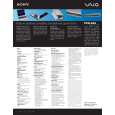 $4.99 PCGK23 SONY
Owner's Manual Complete owner's manual in digital format. The manual will be available for download as PDF file aft…
|
|
|
> |
|