|
|
|
Categories
|
|
Information
|
|
Featured Product
|
|
|
 |
|
|
There are currently no product reviews.
 ;
Great and very well scanned Service Manual, also very fast download - Recomended !
;
I'm quite impressed. I had to wait 24 hours for my manual (quite a rare one) but I got it and the quality was good. Also, from trawling the web, these prices are by far the best.
;
Manuale perfetto. Ottimo e utilissimo. Grazie a questo manuale ho potuto realmente risolvere il complesso problema della stampante.
;
Manuale perfetto. Ottimo e utilissimo. Grazie a questo manuale ho potuto realmente risolvere il complesso problema della stampante.
 ;
Was very fast and accurate service. Just what I needed. I recommend to everyone.
3.2
Removing the Speakers (See Fig.3)
� Remove the net assembly from the cabinet assembly. (See Fig.2.) (1) Remove the eight screws D attaching the two speakers. (2) Take out the two speakers from the cabinet assembly. (3) From the back side of the speakers, disconnect the speaker wires from the speaker terminals.
Cabinet assembly
Speaker terminal Speaker
D D
Speaker wires
Speaker wires Speaker Speaker terminal
Fig.3
3.3
Removing the Center Speakers (See Fig.4)
(1) From the front side of the cabinet assembly, remove the six hooks c attaching the net assembly. (CAUTION) � When removing the net assembly, be careful not to damage the speakers and the cabinet assembly. (Reference) � As the net assembly is fixed with the adhesive and the two-sided tape, remove the net assembly by using a minus driver or similar tool. � Attach the net assembly after applying the adhesive to the hooks c. (2) Remove the eight screws E attaching the center speakers. (3) Take out the center speakers from the cabinet assembly. (4) From the back side of the center speakers, disconnect the speaker wires on the speaker terminals.
Cabinet assembly
Speaker wires Center speakers Hooks c
E E
Speaker wires Hooks c Hooks c Net assembly
Fig.4
Speaker terminal
1-6 (No.MB118)
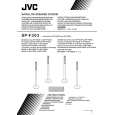 $4.99 SP-F303 JVC
Owner's Manual Complete owner's manual in digital format. The manual will be available for download as PDF file aft…
|
|
|
> |
|