|
|
|
Categories
|
|
Information
|
|
Featured Product
|
|
|
 |
|
|
There are currently no product reviews.
 ;
complete part-lists and pcb layout, schematic diagram is good enlargable,
;
Excellent, fast delivery, excellent product. Good luck!
;
This manual is for the usa model only. But it is clear
, accurate and comprehensive, including board layouts and schematics.
I found it extremely useful for my mitsubishi dp-86da, but the same diagram would also work for the realistic lab5000 and hi fi 80. Thanks.
;
Great to have extra resources for Service Manuals, Now days you can really not trouble shoot efficiently without one , Wayne at IRIONS TV & ELECTRONICS REPAIR Clearwater , Fl. 33755 727-446-7955
 ;
For five bucks you can barely buy a hamburger. Or for the same five bucks you can buy a service manual. Much more useful. (and better for your health, depending on where you buy your hamburgers).
Yes, there are free manual sites out there, but if they don't have what you want, you have to pay.
And five bucks isn't much. Not for full specs, schematics and adjustment and parts replacement procedures.
My only criticism is that grayscale illustrations aren't well rendered, but I've seen worse.
Schematics and text are clear.
I'll be happy to purchase from here again.
Mike
[email protected]
1
2
3
4
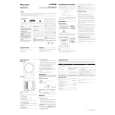
2.2 PANEL FACILITIES
FRONT PANEL
A
4 Crossover knob (CROSSOVER)
1
POWER ON
When using the subwoofer, set the upper frequency limit for the subwoofer (50 Hz to 200 Hz) so that it complements the output from your other speakers. When using the bass management features of an AV receiver, set to BYPASS ON in order to use the low-pass filter of the AV receiver for high quality sound.
5 Bypass switch (BYPASS)
When set to ON, the audio signal is routed directly to the woofer unit, bypassing the amplifier�s filter.
B
6 Phase switch (PHASE 0º /180º)
When set to 180º, the output phase becomes the reverse of the input signal, and when set to 0º, it is in the same phase as the input signal. � Normally, the switch is set to 0º. But when the sound connection between the subwoofer and the left and right speakers sounds unnatural, try switching to 180º and set the switch in the position where the sound is natural. � When using two or more subwoofers together, make sure that the phase switch of all of them are set to the same position.
1 Power Indicator (POWER ON)
Lights green when the power has been switched ON.
NOTE:
C
� If you are planning on switching the unit OFF for a long period of time, make sure to check that the indicator light has gone out after switching OFF.
7 Line Level Input terminal (LINE LEVEL INPUT)
Connect to the SUBWOOFER PREOUT terminal of an amplifier or receiver, with a RCA plug cord.
REAR PANEL
8 Line Level Output terminal (LINE LEVEL OUTPUT)
Used for connecting other equipment through the amplifier. The signal output from this jack is not affected in any way by the settings of the various controls on the unit.
D
9 AC IN
POWER VOLUME CROSSOVER
MAX MIN 200 Hz 50 Hz
2 3 4 5 6
� Connect the power cord to the powered subwoofer unit�s AC IN. � Connect the power cord to a AC socket.
BYPASS
ON OFF
PHASE
LINE LEVEL
OUTPUT INPUT AC IN
7 8 9
E
2 Power switch (POWER)
Switches the subwoofer between ON and OFF.
3 Volume knob (VOLUME)
Sets the subwoofer volume. � Turn the knob slowly from the MIN position. � With this unit, the bass level can be independently set, so do not turn up the bass on the AV amplifier.
F
6
1 2
S-RS3SW
3 4
|
|
|
> |
|