|
|
|
Categories
|
|
Information
|
|
Featured Product
|
|
|
 |
|
|
There are currently no product reviews.
 ;
Product was very good. Received quickly and complete
 ;
The Sony AV-3600 service manual was what I needed for the repair of this unit
Thanks for the good service
Dave
;
I purchased a copy of my old JVC VCR Service manual from Owner-Manuals.com
The copy was complete and valuable to me.
I was able to fix my VCR - it had a bad belt.
I am glad I found Owner-Manuals.com
Great Price. Thanks
;
Great service! I got manual to my sony receiver for very reasonoble price.
;
Good service, well organized. Cheap, and the service manual was as expected. A valuable service for those of us wanting to keep the old junk going!
TL-HP90
Speed dialing
You can dial with a touch of a few buttons by storing a phone number on a dialing button. You can store up to 10 different phone numbers.
Storing phone numbers
1 Press (TALK).
The lamp lights up.
Lamp
2 Press (PGM). 3 Enter the phone number you want to store.
You can enter up to 16 digits for pulse dialing or 15 digits for tone dialing. Note that tone and pause are each counted as one digit.
4 Press (SPEED DIAL). 5 Press one( (0) todialingfor of the buttons (9))
(REDIAL/PAUSE)
the phone number to be stored. And the number is stored.
6 Press (TALK).
The lamp goes off.
Tips � If you enter a wrong number, start from the beginning. � Use the supplied directory to write down what you stored on the speed dialing
numbers.
To store a number to be dialed via Private Branch Exchange (PBX)
Before entering a phone number in step 3, do as follows:
1 2
Enter the outside line access digit (e.g. 9). Press (REDIAL/PAUSE).
To change a stored number
Store a new number as described above, and the old number will erased.
Making calls with speed dialing
1 2 3
Press (TALK). The lamp lights up. Press (SPEED DIAL). Enter the desired speed dialing number ((0) to (9)). The phone number stored in the speed dialing number will be dialed.
Note
If this unit is disconnected from the line for 10 minutes or more, the stored speed dialing data is deleted from the memory.
4
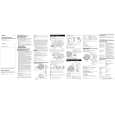 $4.99 TL-HP90 SONY
Owner's Manual Complete owner's manual in digital format. The manual will be available for download as PDF file aft…
|
|
|
> |
|