|
|
|
Categories
|
|
Information
|
|
Featured Product
|
|
|
 |
|
|
There are currently no product reviews.
 ;
Excellent service and prompt delivery. But it's not a manual - only 4 pages wiring diagrams.
Thanks.
 ;
The manual I purchased was exactly what I needed to repair my Toshica television. The manual contained schematics and troubleshooting information that was very helpful.
;
Il download del Service Manual JVC HR 4100 non é stato eseguito
;
The Service Manual was just as expected, complete with schematics and I was able to download it in less than an hour after I ordered it. The only problem with these is that the schematics are hard to read due to the small font. I could remedy this by printing them on a larger printer.
;
Very fast, clear and usefull site !
Also this Service Manual are very well maked and with a very good definition !
Very fast download speed !
Recomended Seller !
3.1.9 Removing the heat sink/power board (See Fig.20 to 27) � Prior to performing the following procedure, remove the front panel assembly. (1) From the bottom of the rear cover, peel off the tape attaching the wire extending from the power board and remove the earth plate which is attached with the double-sided tape. (2) Remove the four screws T attaching the holder in the power unit section. (3) Move the power unit section with the wire from the rear cover temporarily. If necessary, release the band and unsolder the wire on the power board. (4) Remove the four screws U and the screw Y attaching the holder. (5) Release the wire from the band at �e� and move the holder in the direction of the arrow to release from the joint f. (6) Remove the four screws A� and two screws B� attaching the heat sink. (7) Remove the two screws D� attaching the power board.
Power unit section
T
T
T
T
Power unit section
Rear cover Power trnsfomer assembly
Fig.21
Wire
Rear cover Tape
Fig.20
earth plate
Rear cover Ppwer unit section
Fig.22
(No.MB297)1-15
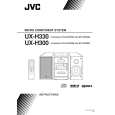 $4.99 UX-H300 JVC
Owner's Manual Complete owner's manual in digital format. The manual will be available for download as PDF file aft…  $4.99 UX-H300 JVC
Parts Catalog Parts Catalog only. It's available in PDF format. Useful, if Your equipment is broken and You need t…
|
|
|
> |
|