|
|
|
Categories
|
|
Information
|
|
Featured Product
|
|
|
 |
|
|
There are currently no product reviews.
 ;
I purchased the unit from a private party and the original owners manual was not available. Having the ability to download it was extremely helpful and clarified operating the equipment immensely. This is a complicated unit and without the manual I would not have been able to maximize it's potential. Thank you.
;
Being a user of older radios of many kinds, preferring them over more modern rigs, this manual was invaluable in the programming of my two. I now know for certain what the assorted buttons functions are, and am very grateful to have found this excellent site. Many thanks for your assistance, Tony.
 ;
Clear and easy to read. All details as expected. Price acceptable , and quick delivery.
;
Quick response and exactly what I was looking for and at a great fair price!
;
5 star quality on these downloadable manuals. Easy to read and all the information is there. A must when doing a custom install or needing to service your precious old school electronics.
48
Recording onto cassette tape
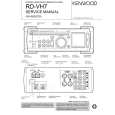
RD-VH7/X-VH7 (EN)
Recording only desired tracks
(ONE TOUCH EDIT.....single track recording)
When playing a CD and a track that you want to record begins, simply press the �O.T.E. (One-Touch Edit)� key. This allows to record the current track from the beginning.
TAPE O.T.E. 7 6
6
RD-VH7
7 stop
Recording preparations are required.
r, t (Steps 1 to 4)
1 Play a CD.
Use other mode than random playback.
Press the �6 CD� key.
If you set �crls� beforehand you can enjoy better recording. y
CD
07 0:08
MUTE N.B.I PROG.1 2 A.P.S. TA NEWS PURE A
TRACK
2 If you want to record the track being played.
Press the �TAPE O.T.E.� key.
07 0:01
N.B.I
TRACK
In case the key is pressed with track No.7.
TAPE O.T.E.
MD
A.P.S. PURE A
÷ Playback restarts from the beginning of the track being played and recording starts at the same time.
÷ When the MD recorder is connected to the amplifiertuner/ CD player, pressing the �MD O.T.E.� key allows to record the CD track onto an MD.
CASSETTE DECK OPERATIONS
To end recording in the middle
Press the �7 stop� key in the middle of playback.
CD
When recording has been completed, a non-recorded portion of 4 seconds will be produced and the cassette deck part will stop. The CD player will enter temporary stop condition. To record a different track, repeat the steps 1 and 2.
|
|
|
> |
|